Soulja Boy Official
Publisher Description

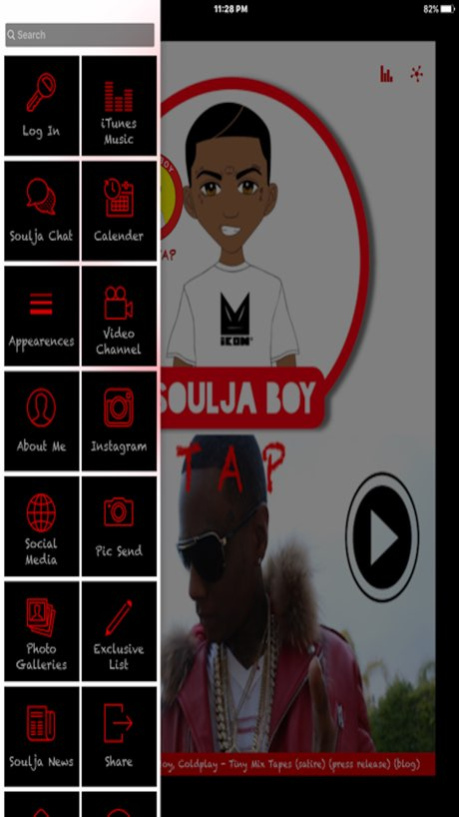


Welcome to the OFFICIAL Mobile App of SOULJA BOY !
Soulja Boy is a platinum selling recording artist known for hits "Crank That" and "Turn My Swag On".
Soulja Boy Tell Em (born DeAndre Way) is an ambitious artist and a seasoned businessman, wielding all the hit making requirements: producer, live entertainer, and entrepreneur.
Soulja Boy has helped redefine the music industry by utilizing social media and engaging with fans. Before the age of 18, his self-published single "Crank That (Soulja Boy)" reached number one on the US Billboard Hot 100 and it later became a number-one hit in the United States for seven weeks.
After the success of spreading his music through the Internet in 2004 and establishing his Stacks on Deck entertainment brand, he’s continued to pursue his musical career, manage a record label and create a clothing line.
He's been seen on some of your favorite reality shows. Throughout his career, Soulja Boy has definitely been a pioneer in music, being one of the first to use the internet to propel and maintain a strong fan base, creating history in the music industry and the way we digest media.
With the Official Mobile App, you can:
- Check for tour info
- Preview and purchase music
- Chat with Soulja and each other
- Much more!
About Soulja Boy Official
The company that develops Soulja Boy Official is AppItMobile, Inc.. The latest version released by its developer is 1.0 .
To install Soulja Boy Official on your iOS device, just click the green Continue To App button above to start the installation process. The app is listed on our website since 2026-09-03 and was downloaded 18 times. We have already checked if the download link is safe, however for your own protection we recommend that you scan the downloaded app with your antivirus. Your antivirus may detect the Soulja Boy Official as malware if the download link is broken.
How to install Soulja Boy Official on your iOS device:
- Click on the Continue To App button on our website. This will redirect you to the App Store.
- Once the Soulja Boy Official is shown in the iTunes listing of your iOS device, you can start its download and installation. Tap on the GET button to the right of the app to start downloading it.
- If you are not logged-in the iOS appstore app, you'll be prompted for your your Apple ID and/or password.
- After Soulja Boy Official is downloaded, you'll see an INSTALL button to the right. Tap on it to start the actual installation of the iOS app.
- Once installation is finished you can tap on the OPEN button to start it. Its icon will also be added to your device home screen.
Program Details
System requirements
Download information
Pricing
Version History
version -
posted on 2026-09-03
version 1.0
posted on 2016-04-29
Apr 29, 2016 Version 1.0
This app has been updated by Apple to display the Apple Watch app icon.
version 1.0
posted on 2016-04-29
Apr 29, 2016 Version 1.0
This app has been updated by Apple to use the latest Apple signing certificate.
version 1.0
posted on 2016-04-29
Apr 29, 2016 Version 1.0
This update is signed with Apple’s latest signing certificate. No new features are included.
version 1.0
posted on 1970-01-01
2016年4月29日 Version 1.0
This app has been updated by Apple to use the latest Apple signing certificate.
version 1.0
posted on 1970-01-01
2016年4月29日 Version 1.0
This update is signed with Apple’s latest signing certificate. No new features are included.
